
You may not know this, but if you don’t Disable Per User MFA for your users before you start enforcing it with Conditional Access, it wreaks havoc with your policies. I found this out the hard way. I had to disable MFA for a group of users who were in a session that would make using MFA rather cumbersome.
What Happens when you have both Per User MFA and Conditional Access for MFA
Microsoft recommends that you completely disable Per User MFA. If you don’t use Per User MFA but it still enabled on some accounts, it takes precedence over conditional access. This is why some of your users get exempted from a conditional access policy for MFA and some do not. It makes it difficult to troubleshoot MFA issues. I know!
Why Disable Per User MFA With MS Graph
There are a couple of reasons why you would want to do this. One, you have users logging in from a single location that is trusted and secure. There is no need to have them constantly verifying their identity when all they are trying to do is work. Two, you have a temporary need, and it makes sense for your users to not have to use MFA for the work they are doing (i.e. software training).
I will discuss two ways you can fix this issue.
Note: the Ways I am about to describe require you to have at least the Authentication Policy Administrator Role to administer MFA Status.
Disable Per User MFA Through the Portal
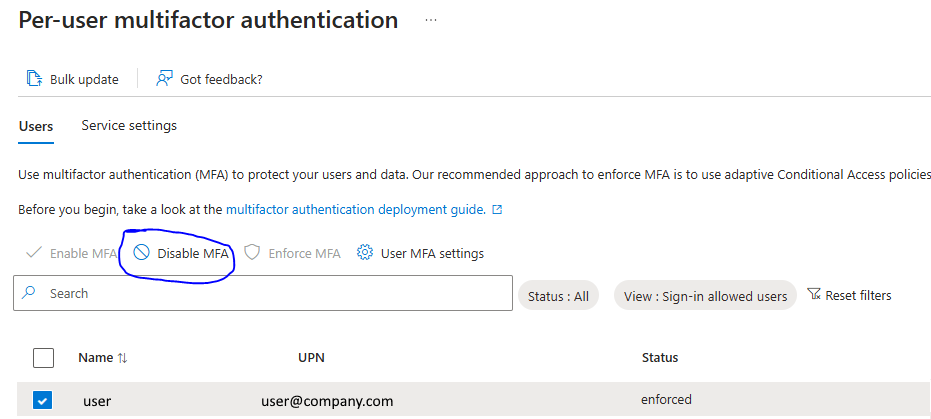
This way is simple. I would use it if you only had a few users to do. Go to the portal and in the Per User MFA section, check the user and then click disable MFA above:
Disable Per User MFA Using Microsoft Graph
This is the better way to go to disable per user MFA if you have several users. First you need to export users to a csv using the portal. From that CSV file, you need to take the Object ID column and put it in it’s own CSV with the Column heading ObjectID. Make sure the CSV file is named ObjectID.csv and it resides in the same folder as the script.
Here is the script:
# This Requires the PIM of "Authentication Policy Administrator". If you get a 403 error this is why.


Connect-MgGraph -Scopes "User.Read.All", "Policy.ReadWrite.AuthenticationMethod"


#Path to UPN File #


$CSVPathUPN = ".\ObjectID.csv"


##Run Script##


##Try import UPN CSV file##


Write-Host Importing CSV


try {

    $MFAUsers = import-csv $CSVPathUPN -ErrorAction stop

}

catch {

    throw "Error importing CSV: $($_.Exception.Message)"

    break

}


foreach ($MFAUser in $MFAUsers) {


# Fill in user ID

$userid = $MFAUser.ObjectID


# MFA status

$body = @{"perUserMfaState" = "disabled" }


# Invoke the request to update MFA status

Invoke-MgGraphRequest -Method PATCH -Uri "/beta/users/$userid/authentication/requirements" -Body $body


}


Write-Host All Users Per User MFA set to Disabled
Dan

I am an Senior IT professional with several years experience in the field. I have supported thousands of users over the years. The organizations I have worked for range in size from one person to thousands of people. I have performed support from Help Desk, Network / Cloud Administration, Network Support, Application Support, Implementation and Security.