

If you are a larger organization, you are probably still running Classic Outlook or just Outlook as we like to call it. Now you need to evaluate New Outlook vs Classic Outlook because Microsoft is mandating that you do….
It is better to go eyes wide open into this. Changing the toggle to evaluate New Outlook is one thing but if you don’t know the changes (translation: features they have changed or taken away) you are in for a big surprise. When it comes default on all M365 installations. At least they left the toggle visible and business customers have support until 2029.
I have compared both versions and here are 4 features I have found that might leave you scrambling after the switch if you are not careful….
New Outlook vs Classic Outlook – Public Folders
I will start with what night be the most detrimental change for some organizations. No, public folders are not dead but they are on life support. In true Microsoft fashion, instead of just saying “This feature will be retired by X Date” they transition functionality from Good to Bad to Worse to Non-existent and that’s precisely what they are doing now.
I would say it is the worse stage now. The only way I could get access to Public folders in New Outlook was to not use it. I had to go to Outlook on the web and then jump through hurdles to configure viewing it. Try getting a normal user to do this. They will tell you to “go pound salt”.
Signatures
I have already posted about this one. This change is also using Microsoft’s “slight of hand”. To get users to transition in newer versions of Classic outlook, they added a dropdown box allowing you to still store signatures locally in the app but also choose to put a signature in the cloud (available to all devices that login to Outlook). I suggested manually copying and pasting you signature from local to cloud. Once you switch to New Outlook the ability to do this will be gone.
PST Files
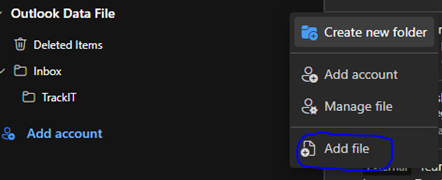
To discourage users from continuing to use PST files they make it difficult to mount them. What happens is after the switch your PST file get disconnected and you will have to re-mount them. Maybe Microsoft was hoping you would forget about them LOL. You will have to jump through some hoops to get them mounted after you switch.
Shared Tasks
It can be done but is now done through “To-Do”. The behavior is different than the old, shared tasks. I am not sure if old shared tasks are transferred without issue during the switch. My testing so far shows that shared tasks will need to be recreated. This will be a problem for uses who live and die with this feature.
Verdict of New Outlook vs Classic Outlook
It will be like any switch to any newer version of software when comparing New Outlook vs Classic Outlook. There will be a core group of users who will bemoan the change. To them, it is a major disruption of their work flow. But to most it will primarily go unnoticed. They will just notice the shiny new look of the screens and buttons. Ignorance might be bliss for most users but not for IT support!
Dan

I am an IT professional with over twenty five years experience in the field. I have supported thousands of users over the years. The organizations I have worked for range in size from one person to hundreds of people. I have performed support from Help Desk, Network / Cloud Administration, Network Support, Application Support, Implementation and Security.