

Have you just tried to do this? Samsung S25 and Intune Enrollment Fails. It fails and for the stupidest reason. Read Below.
What is Supposed to Happen
With Intune enrollment, once you have created an enrollment profile all you need to do is take an Android phone, tap the screen five time and then scan the QR code to begin the process. Easy, right?
Why Samsung S25 and Intune Enrollment Fails
Well, all is fine and dandy in the process until you get to the screen where you must pick a Category for your devices. This is something you have set up beforehand to separate your devices (i.e. Office Mobiles, Office Computers, etc.…).
Samsung has done something with their UI where you can’t tap OK to get to the next screen. There is a grey bar or something that covers the OK button preventing you from tapping it.
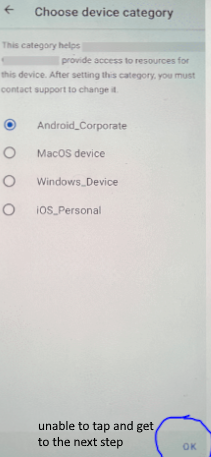
How To Fix Samsung S25 and Intune Enrollment Fails
It is not a fix but a workaround. This is something Samsung needs to fix quickly. There is going to be a lot of fuss over this. In the meantime, you can work around it by doing the following.
Once you get to the screen above, you can go no further, Shut the phone off. It is already registered in Intune. You can finish the set up there.
And search for the device you were settings up. It starts with the username of whom your were enrolling in Intune.

Then click on the device, which brings it to its screen. Click Properties and give it a device category:
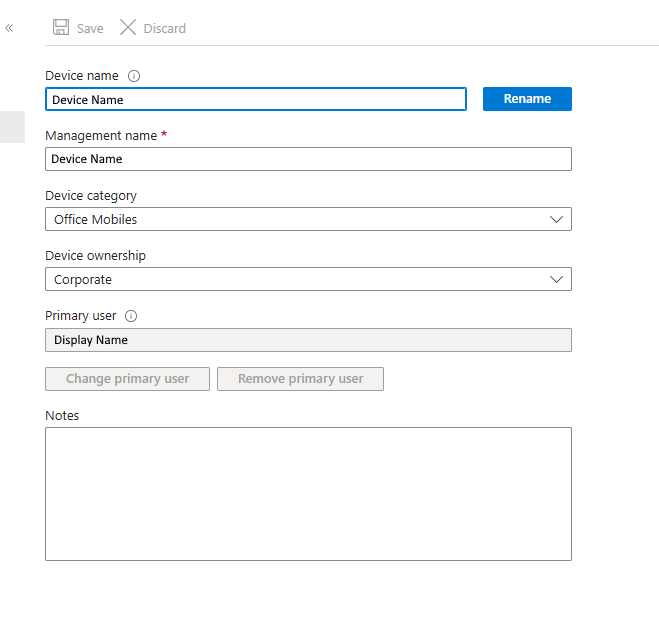
Save the entry and restart the Android Phone. You will then continue with the enrollment process as if nothing was wrong (But there was a lot wrong LOL).
Hopefully you haven’t got a huge batch of S25’s to enroll in your organization. Until Samsung fixes this (or Microsoft), it’s gonna be a long night!
Dan

I am an Senior IT professional with several years experience in the field. I have supported thousands of users over the years. The organizations I have worked for range in size from one person to thousands of people. I have performed support from Help Desk, Network / Cloud Administration, Network Support, Application Support, Implementation and Security.